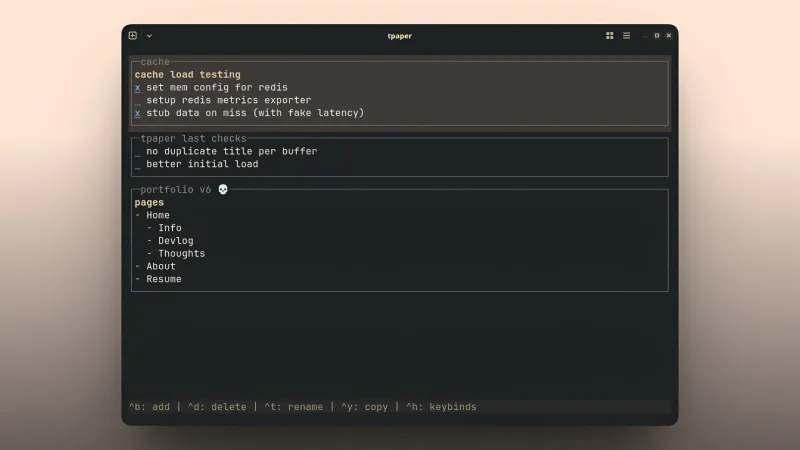
What is tpaper?
tpaper is a note-taking CLI tool built around the concepts of blocks and buffers.
- Block: An individual note within a buffer, written in Markdown and rendered with syntax highlighting directly in the terminal.
- Buffer: A named collection of blocks, stored as a Markdown file on disk. Think of it as a page or a tab.
Choosing OpenTUI for Convenience
Building a TUI can be tedious, especially when dealing with responsive layouts. I usually rely on Go and bubbletea because I find the Elm architecture intuitive and appreciate Go’s raw performance. However, building a complex layout from scratch in bubbletea would have been too time-consuming.
OpenTUI caught my attention because it supports CSS-like Flexbox layouts and relative units (like percentages). Even better, it allows for SolidJS bindings, making the UI reactive by default. These features ultimately convinced me to give it a try.
Core Implementation
The tool follows typical SolidJS patterns using signals and effects. One specific implementation to note is the global state management: I used a SolidJS store defined in a separate file and imported it wherever needed. While this might not be the most efficient architectural choice, it works perfectly for now, and the store remains reactive.
Data is stored in single Markdown files on the system, where one file equals one buffer. Block metadata, such as the title and ID, is stored in a comment block above the content, which serves as a delimiter.
Memory Usage
tpaper currently consumes around 80 MB of RAM on my machine (Linux x64). This raised a few questions:
- I previously built a simple typing test TUI in Go that used only 10 MB. Since OpenTUI leverages a terminal core written in Zig, why is there such a large difference?
- Is the overhead coming from the SolidJS bindings, or perhaps the Markdown parsing stack (renderer)?
- Could my implementation be the issue?
First Impressions of OpenTUI
It was really convenient to use the flexible layout system and SolidJS reactivity, but I don’t think I would choose it over Go’s Bubble Tea for a serious tool. The Elm architecture is very straightforward to use, and Bubble Tea itself is simple and relies on literally just two or three markdown guides—which, at least when I learned it, were more than enough. On the other hand, while the OpenTUI docs are useful, I couldn’t find all the necessary information regarding their markdown component (specifically the parser, which you have to handle yourself during the build).
Regarding the memory footprint: if the 80 MB usage is inherent to the SolidJS bindings or the Markdown renderer, that’s a drawback. That said, it isn’t a dealbreaker; even on my 8 GB machine, 80 MB is not a significant amount.
Why build a new tool?
When I’m in the flow, I need a place to jot down short-term goals and tasks before I forget them. Opening Notion is too slow, and standard text editors require the extra friction of manually naming and saving files.
I previously tried a scratchpad tool called Buffer, which I loved for its minimal interface. However, it lacked persistent storage. I then tried Heynote, which seemed perfect until I ran it on my Linux desktop. The UI was broken; text colors were inverted and illegible, likely due to my use of niri (a tiling compositor) rather than a full desktop environment. I loved Heynote’s block-and-buffer concept, though. I also looked at thoth, CLI tool akin to heynote, but it lacked multi-buffer support, forcing all blocks into a single vertical stream.
Since I don’t know Rust, C, or C++, building a native app wasn’t an option, and I definitely didn’t want to build another Electron app. A TUI was the only logical choice for my skill set. It fits my workflow perfectly because opening a terminal is fast, and it keeps me in the flow.
That wraps up my first devlog! I’m really glad I finally started writing these, and I’m looking forward to sharing more of the journey.